
In order to sign up for a session that is sponsored by your District or Division, you may need an Enrollment Key. If you have not received an Enrollment Key please reach out to your Coordinator to enquire about your Course participation.
If you have received your enrollment key, you can redeem it with the following steps.
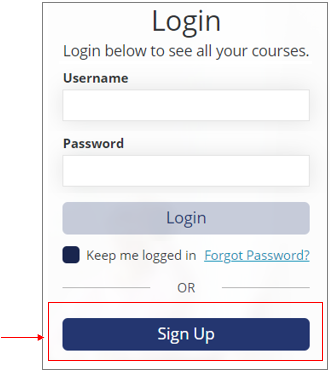
On the login page of https://academy.thelearningbar.com, click the Sign-Up button beneath where you are asked for a username and password.
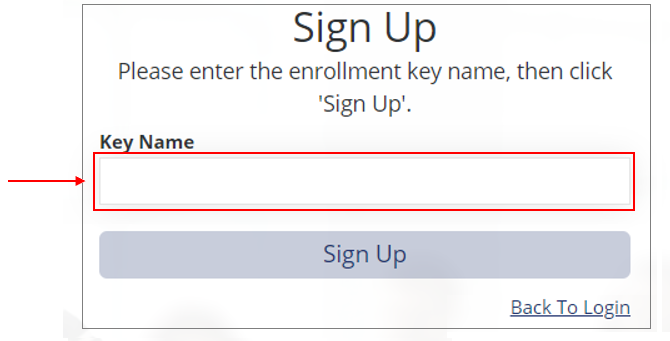
You can then enter the Enrollment Key you should have received from your coordinator.
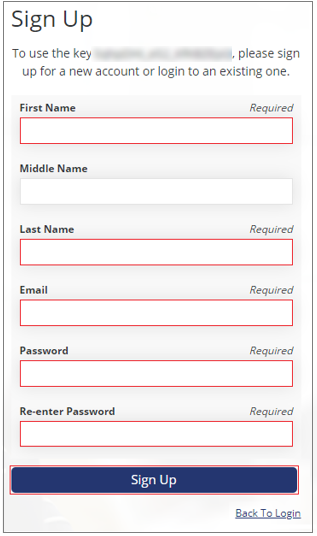
You will then be presented with this page where you are required to enter your First Name, Last Name, Email, and create a password, in order to complete your registration.
Upon the completion of your registration, you will be redirected to your course dashboard where you will be able to immediately start the course!
You will also receive an email confirmation of your course enrollment.
If you need further support please contact us at:
learning-support@thelearningbar.com or call 1-877-240-2424.